
“What volume discount has Berral agreed?”
12% from 400 units per order, reviewable each calendar year.
Berral framework agreement· p.7
The platform
One request cites the contract, creates the client and books the review — and all three are recorded by the same rule. That is not something you get by integrating five tools: you get it by not having five.
Knowledge
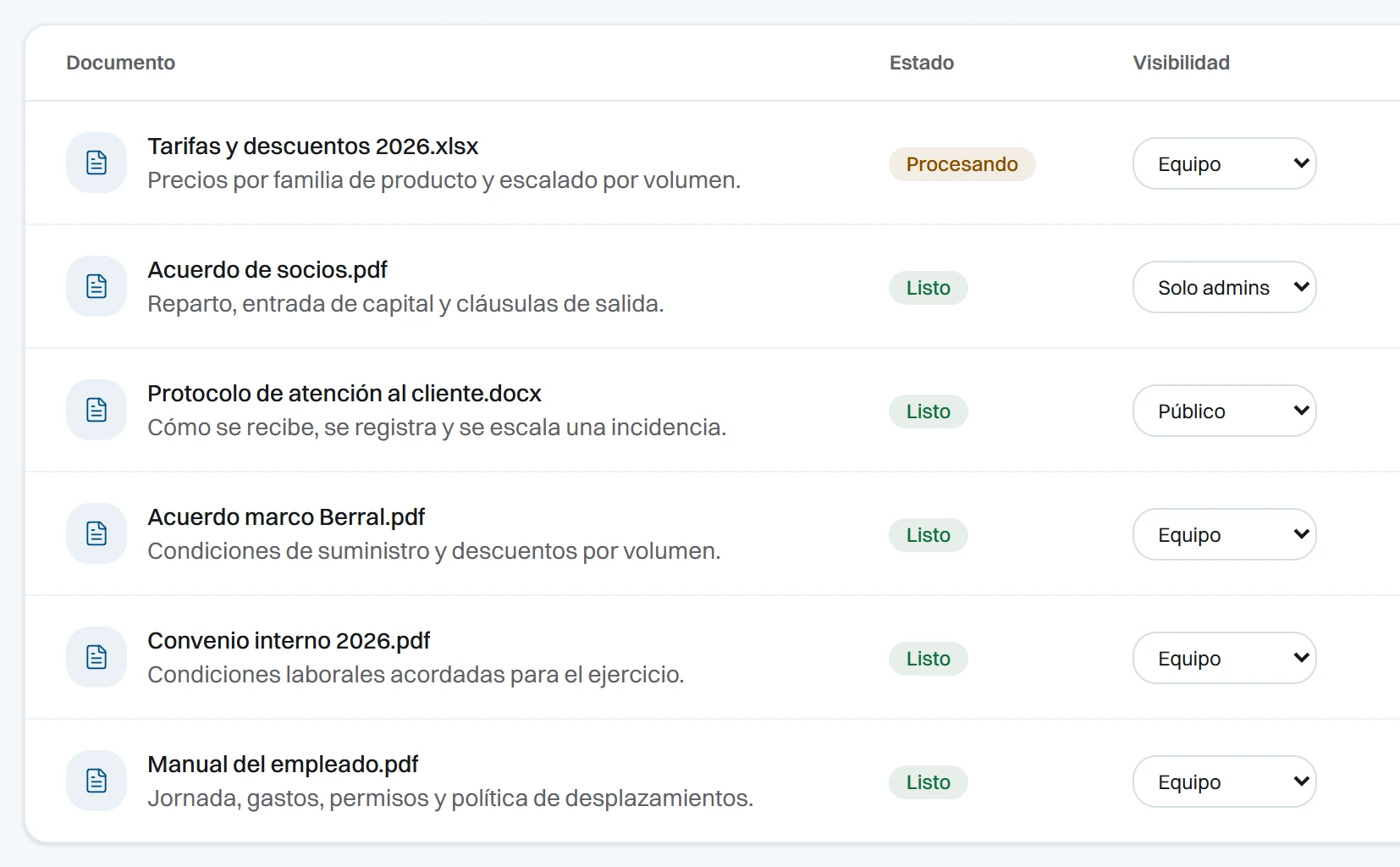
You drag in a PDF, a Word file, an Excel sheet or plain text. It is searchable in seconds. And if something fails on the way up, it tells you why.
Two layers of control sit on top. First you decide who sees it: public, team-wide or admins only. Then, document by document and person by person: read, manage, or no entry. Denial always wins.
Connections
You paste the address of a public page: an official gazette, a trade association circular, your own website. Voti reads it and indexes it like any other document, with its origin marked. What you watch is checked daily; your own site, weekly. And if an address stops answering, it is parked and you are told.
When a page changes, it lands in your morning alert. And with it, up to three of your own documents that resemble it. They are called related, not affected: this is proximity between texts, not a legal reading. Voti does not interpret the rule. It tells you what has moved, and where to start.
The assistant
Potens answers with the indexed documents and cites which one and what page. When what it retrieved does not cover the question, it says so instead of filling the gap, and the question is logged with no author in the pending-knowledge list.
And it operates: it creates clients, checks availability, books, reschedules, cancels, opens deadlines, lists the day’s calendar and generates documents from your templates. What can be undone, it does; what cannot, it asks first. Every read and every denial land in the log with Potens as the actor.
Clients
Each client is a record: legal name, tax ID, address and the tags your team files them under. Hanging off it are their contact people — with role, email and phone — the history of what has happened, the team’s notes, the linked documents and their case files. The origin of the record and the person responsible stay traced.
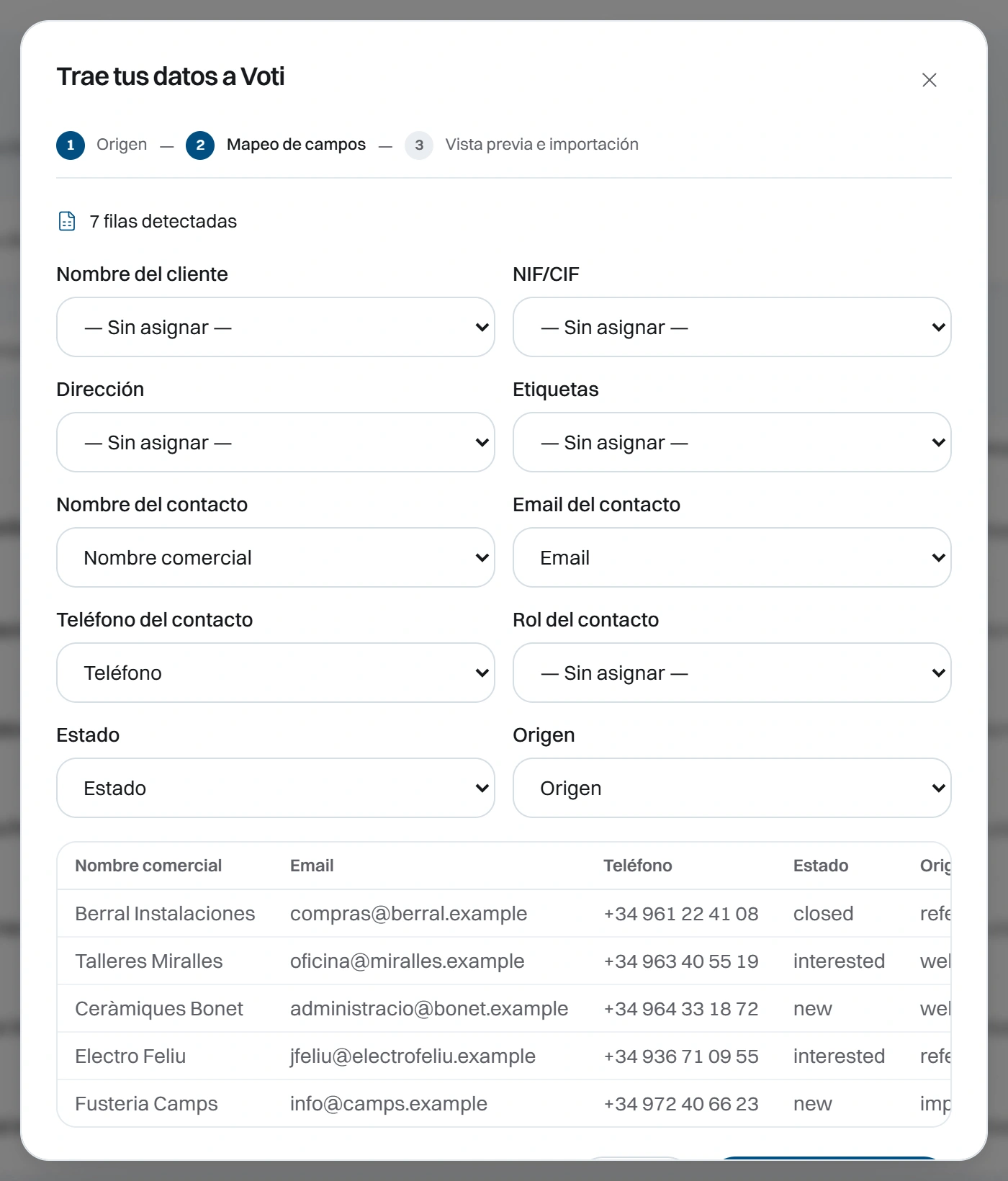
You import your CSV or your Excel and map which column is which field. Voti validates the emails, skips duplicates and tells you how many came in, how many were skipped and how many failed. If one record clashes with another, it blocks it and stores the reason.
Calendar and deadlines
The calendar has day, week and month views, type and location per meeting, and team availability by day and time slot. Deadlines are something else: type, due date, owner and status, with a severity that comes from the days remaining.
Every morning, what is critical reaches whoever it falls to. In the app and by email, in their language. You switch it off with one toggle. Before a meeting you ask for the brief: what is on record for the client and their documents. It is a brief to prepare with, not minutes. Voti does not record or transcribe.
Documents
A template is a .docx with variables or a PDF with fillable fields. It works with your templates exactly as they are: variables are detected on their own.
On generation, client data comes from their record and the issuer block — legal name, tax ID and address — comes from Settings. You download the document as Word and as PDF, and it is stored with the exact values used and the record it came from. What is generated does not go back into knowledge: what the company produces cannot later be cited as what the company knows.
Team and control
You invite with a single-use link. It expires, and you revoke it while nobody has used it. Whoever comes in arrives with their role already set. They sign in with a password or with their Google account. And if you require two-step verification, anyone who has not set it up does not get in.
Every access lands in the audit log with its actor, the resource, the moment and the outcome — and the actor can be a person or Potens. Global search (Ctrl K) covers clients, documents, meetings and conversations, and returns only what the person searching is allowed to see.
Bring your documents and your clients, invite your team and check it for seven days. From €59/month, no lock-in.